

At a glance
BacklinkGPT vs BuzzStream
BuzzStream is a traditional outreach CRM built around contact history and team process. BacklinkGPT is different: an AI agent that hunts backlinks for your domain every night — and you approve every send.
- You want an agent, not a CRM to maintain: it scans SERPs nightly, judges every page with a written rationale, finds the right contact, and drafts the pitch.
- You want autonomy with a safety rail: nothing sends without your approval, sends stay inside your window, and senders warm up automatically.
- You want honest capacity pricing: plans sell senders + daily pace; credits (2,000 / 6,000 / 20,000) are a fair-use meter, not a puzzle.
- You want a classic outreach CRM with strong contact and relationship tracking.
- Your team already works import-first (Ahrefs, Semrush, spreadsheets) and mainly needs outreach execution.
- You need mature team permissions and can work with non-real-time link checks.
TL;DR
The short version. Use the sections below if you need details.
- BuzzStream is an outreach CRM with a familiar campaign-and-list model: you build the lists, run the campaigns, and keep the records.
- BuzzStream link monitoring runs on a two-week cadence (not real-time).
- BacklinkGPT is an autonomous agent working your domain: it hunts every night, judges every page with a written rationale, and drafts the outreach — nothing sends without your approval.
- Pick BuzzStream for CRM-heavy operations. Pick BacklinkGPT when you want the pipeline moving while you sleep.
Pricing snapshot
BuzzStream pricing, without the guesswork
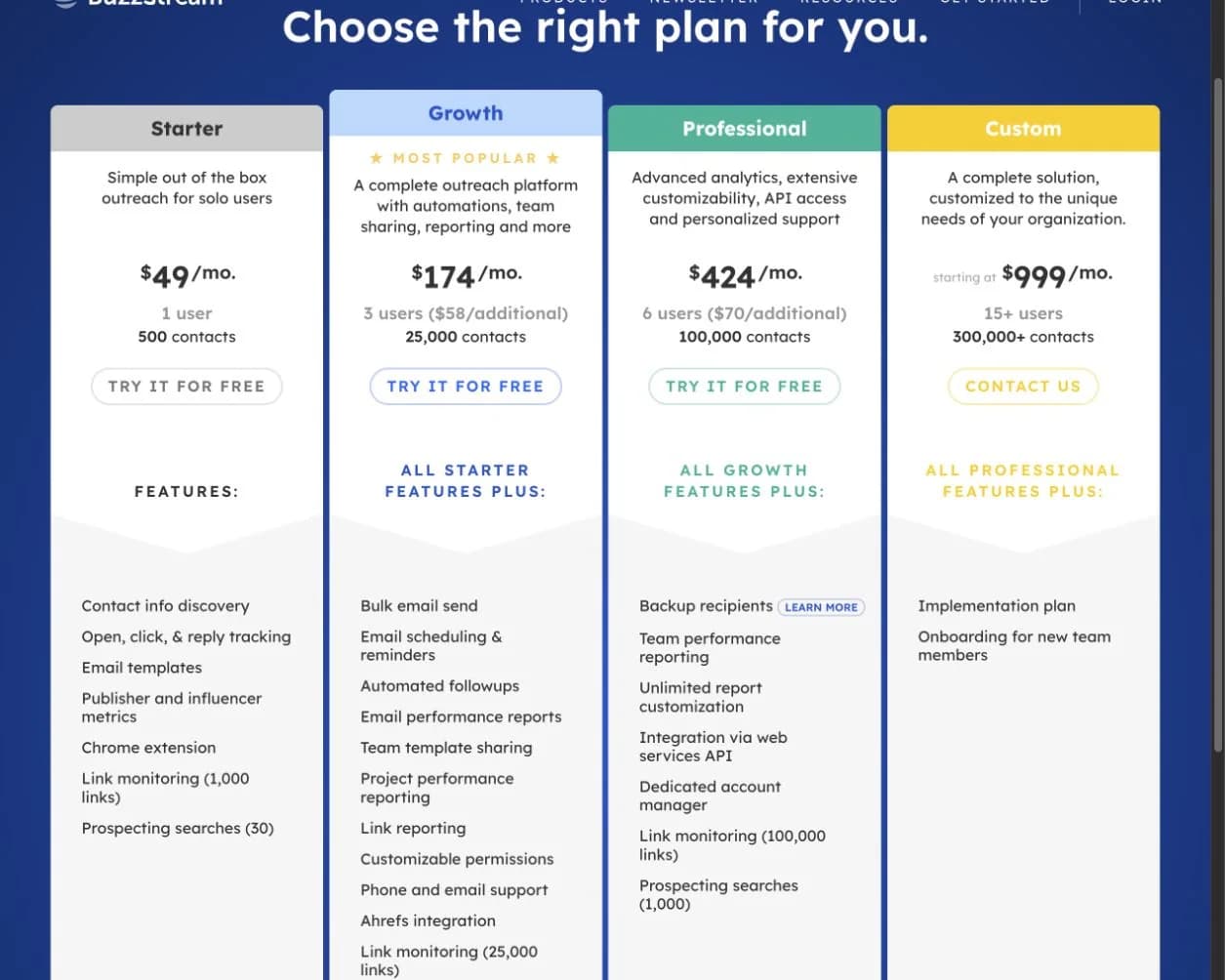
This is the public pricing page we used for the comparison. Here are the numbers worth paying attention to.
What you need to know
- BuzzStream currently starts at $49/month for one user and 500 contacts.
- Bulk sending, automated follow-ups, team sharing, and reporting begin on the $174/month Growth plan.
- API access appears on the $424/month Professional tier; the Custom tier starts at $999/month.
The screenshot confirms listed plans and allowances. It cannot show how much manual list building, CRM upkeep, or process management your team will need.
See the live page
https://www.buzzstream.com/plans-pricing/View pricingCompare (simplified)
A simplified view of common evaluation criteria.
Which is the better fit?
 BacklinkGPT
WORKFLOW
AI workflow + outreach
 BuzzStream
OUTREACH CRM
Classic outreach tracking
Primary workflow
What the product is optimized for.
BacklinkGPT
Agent-run: nightly hunts -> approved sends -> live linksBuzzStream
Outreach CRM + relationship historyPublished price floor
The typical starting point before add-ons.
BacklinkGPT
BacklinkGPT: Starter $149/mo, Growth $399/mo, Scale $999/moBuzzStream
$49/mo (Starter), $174/mo (Growth), $424/mo (Professional)Prospecting model
Where prospects typically come from.
BacklinkGPT
The agent hunts nightly; every page judged keep/drop with a written rationaleBuzzStream
Import-first; limited built-in searchesLink monitoring cadence
How quickly link changes are detected.
BacklinkGPT
Live links tracked as part of the agent’s loopBuzzStream
Every ~2 weeks (monitoring checks)Pricing model
How cost scales as you add people/volume.
BacklinkGPT
Capacity: senders + daily agent pace (credits are fair-use fuel)BuzzStream
Tiered by users + contact limitsIncluded allowance
What you get before paying extra.
BacklinkGPT
2,000 / 6,000 / 20,000 prospect credits (by plan)BuzzStream
Contacts + searches + link monitoring limits (by tier)Sending safeguards
How the tool prevents over-sending.
BacklinkGPT
Enforced 30 email attempts/day per inbox (≈900/month/inbox; follow-ups included)BuzzStream
Bulk send requires Growth+; guidance-based (BuzzStream suggests caps like ~200/day depending on provider)API access
Is API available without top-tier plans?
BacklinkGPT
Not the core focusBuzzStream
Professional tier ($424/mo) and aboveWorkflow: how teams use it
This is where the biggest day-to-day difference appears—not just in the feature list.
BacklinkGPT workflow
- 1
Enter your domain
The agent reads your site, picks target pages, seeds keyword angles, and judges its first prospects in minutes.
- 2
It hunts every night
Nightly SERP scans, competitor backlink mining, and contact discovery keep the pipeline stocked — on your timezone, within your plan.
- 3
You approve, it lands
Drafts wait in your review queue; approved sends go out in your send window, replies get triaged, and live links are tracked.
BuzzStream workflow
- 1
Build and manage contact lists
Organize prospects and contacts in a CRM-first model.
- 2
Track relationship history
Keep notes, touchpoints, and engagement details over time.
- 3
Run outreach sequences
Send email and track opens/replies in a more traditional outreach flow.
- 4
Manage tasks and follow-ups
CRM workflows and reminders keep outreach consistent.
- 5
Reporting
Share campaign and relationship metrics with your team.
Deep feature comparison
Where CRM-first vs backlink-first shows up in real work.
Which is the better fit?
BacklinkGPTWORKFLOW
Backlink-first
BuzzStreamCRM
Relationship-first
Prospecting philosophy
Where lists come from most of the time.
BacklinkGPT
The agent judges every page (keep/drop + written rationale); keep-rates tune next huntsBuzzStream
Import-first + Chrome extension captureSystem of record
What the tool is best at keeping accurate.
BacklinkGPT
Opportunity pipeline tied to link outcomesBuzzStream
Contact database + relationship historyAI assistance
Personalization and drafting help.
BacklinkGPT
The agent drafts every pitch; you approve every sendBuzzStream
BuzzStream CRM: limited AI (ListIQ is separate product)Link monitoring cadence
How quickly you’ll notice a lost link.
BacklinkGPT
Built into the core workflow (backlink-first)BuzzStream
Every ~2 weeks (published help behavior)Bulk send + API gating
What features are locked to higher tiers.
BacklinkGPT
Not the core focusBuzzStream
Bulk send not on Starter; API on Professional+UI complexity / learning curve
What teams tend to feel day-to-day.
BacklinkGPT
LowerBuzzStream
Higher (commonly cited as dated/clunky by reviewers)Pricing details that affect the real cost
Compare the limits, add-ons, and scaling rules—not only the starting price.
BacklinkGPT
Model
subscription = capacity (senders + daily agent pace); credits are a fair-use meter
Included
- 2,000 / 6,000 / 20,000 prospect credits (fair-use, by plan)
- 1 / 3 / 6 connected senders included
- 7-day trial — the agent shows its work before you pay
Usage & add-ons
- Extra credits: $0.03 (top-up pack or opt-in overage)
- Extra sender: $19/month
Notes
- One marginal price for credits everywhere — no overage arbitrage, no surprise bills.
- Upgrades buy real throughput: more senders and a faster daily pace, not just bigger numbers.
BuzzStream
Model
Tiered plans typical of outreach CRMs (contacts/users/searches scale by tier).
Included
- CRM-style contact and relationship tracking.
Usage & add-ons
- Users, contacts, and link monitoring limits scale strongly by tier.
- Bulk email send is not available on the lowest tier.
- API access is gated to Professional ($424/mo) and above.
- Link monitoring checks run every ~2 weeks (not real-time).
Notes
- If you want a familiar outreach CRM, confirm the exact caps that map to your team size and monthly volume.
A practical switching plan
Move one workflow at a time, keep the outreach history you need, and test sender setup before scaling.
Steps
- 1
Export lists, contacts, and notes
Keep only the fields you actually use, and clean duplicates.
- 2
Define pipeline stages
Align stages with your link-building process (not just “sent” and “replied”).
- 3
Port templates and personalization fields
Start with the sequence you trust most, then iterate.
- 4
Pilot with one segment
Choose one niche or campaign type to validate quickly.
- 5
Scale gradually
Increase volume once deliverability and workflow fit are stable.
Checklist
- Deduplicate contacts and domains.
- Import blocklists/do-not-contact rules.
- Decide ownership for replies and negotiations.
- Define success metrics: links shipped and link retention.
The question that matters most: do you need a CRM or an agent?
BuzzStream is strongest when a team wants a shared relationship record: who contacted a publisher, what happened, and what should happen next. It does not remove the need to define the strategy, build the right list, inspect prospects, and keep the database clean. BacklinkGPT is the better fit when you want the system to make and explain more of those decisions before your team reviews them.
The independent review footprint is mature. Buyers often praise BuzzStream's organization, contact history, team collaboration, and value. The trade-off is a more traditional CRM workflow, with more setup and upkeep than an autonomous agent.
Who is behind BuzzStream?
BuzzStream launched in 2008 and is led by co-founder and CEO Paul May. The company has stayed focused on relationship-based PR and link-building outreach for well over a decade, which helps explain its CRM-first design and established customer base.
Questions to ask before choosing
Quick answers to the points worth checking before you choose.
Sources
Last reviewed: 2026-07-23
BuzzStream pricing
https://www.buzzstream.com/outreach/public-relations/plans-pricing/BuzzStream plans pricing
https://www.buzzstream.com/plans-pricing/BuzzStream link monitoring cadence (help)
https://help.buzzstream.com/en/articles/4246641-setting-up-link-monitoringBuzzStream launch-era customer history
Documents customer use dating back to the 2008 launch.
https://www.buzzstream.com/blog/how-two-startups-streamlined-their-organizations-and-outreach-to-drive-more-links/BuzzStream reviews on G2
Independent review footprint and buyer feedback.
https://www.g2.com/products/buzzstream/reviews


