

At a glance
BacklinkGPT vs Mailshake
Mailshake is a cold-email sequencer you set up and drive. BacklinkGPT is different: an AI agent that hunts backlinks for your domain every night — and you approve every send.
- You want an agent, not another sequencer: it scans SERPs nightly, judges every page with a written rationale, finds the right contact, and drafts the pitch.
- You want autonomy with a safety rail: nothing sends without your approval, sends stay inside your window, and senders warm up automatically.
- You want honest capacity pricing: plans sell senders + daily agent pace; credits (2,000 / 6,000 / 20,000) are a fair-use meter — not seat-based outbound pricing.
- You mainly need cold email sequences for sales/outreach beyond link building.
- You want warm-up + verification and A/B testing built into the outbound tool.
- You don’t need backlink placement verification or link monitoring inside the product.
TL;DR
The short version. Use the sections below if you need details.
- Mailshake is an outbound sequencing tool: you build the lists and run the campaigns. BacklinkGPT is an autonomous agent working your domain — nightly hunts, judged prospects, drafts waiting for your approval.
- Mailshake cost scales with seats (and tiered caps). BacklinkGPT sells capacity — senders + daily agent pace — with credits (2,000 / 6,000 / 20,000) as a fair-use meter.
Pricing snapshot
Mailshake pricing, without the guesswork
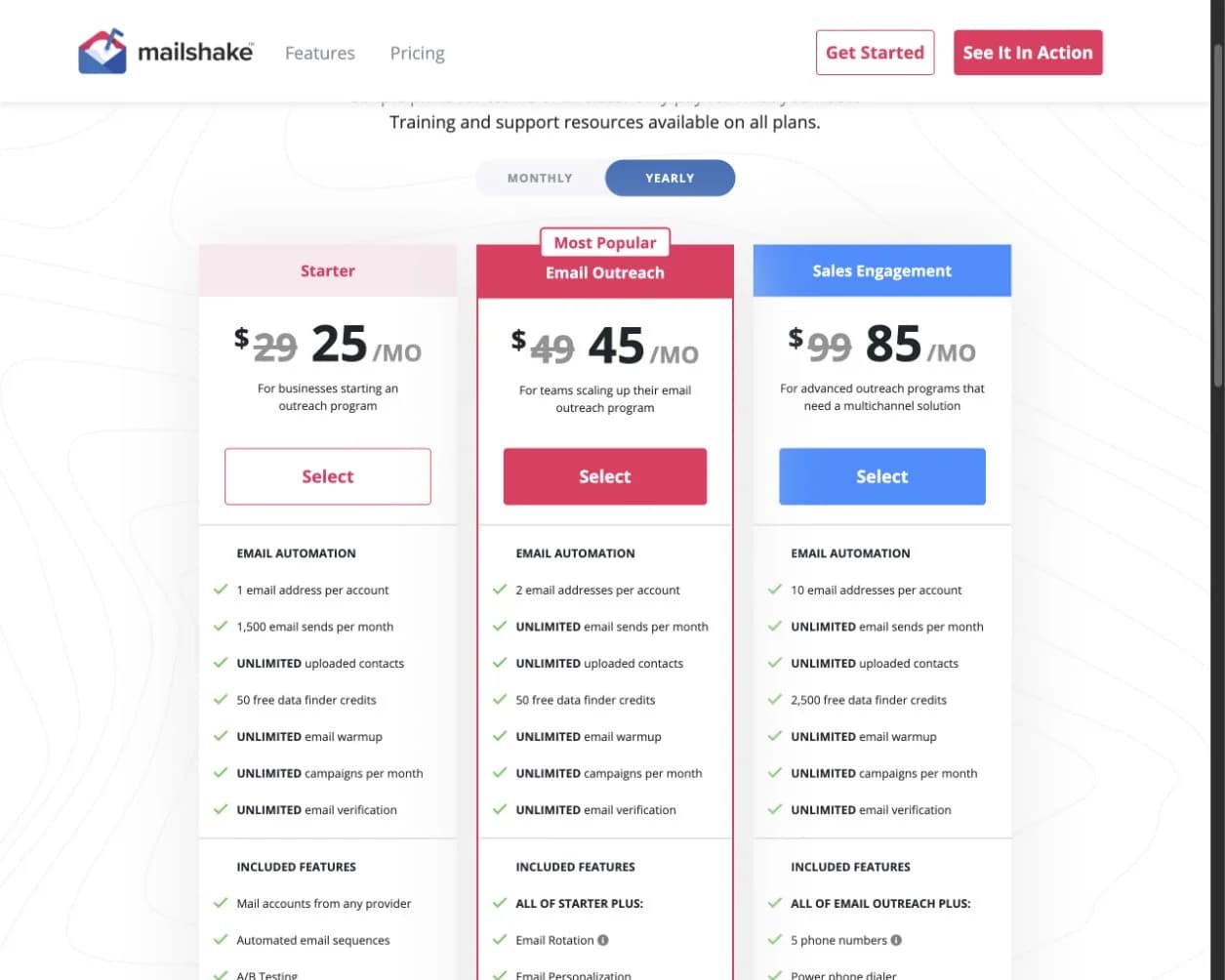
This is the public pricing page we used for the comparison. Here are the numbers worth paying attention to.
What you need to know
- Mailshake currently lists $29, $49, and $99 monthly plans, with lower prices for annual billing.
- The product prices email and sales-engagement capacity, not backlink prospecting or verified placement outcomes.
- Its FAQ says payment is collected up front and no free trial is offered.
The capture verifies Mailshake’s published plan structure. It does not include the separate cost and labor of sourcing, qualifying, and monitoring backlink prospects.
See the live page
https://mailshake.com/pricing/View pricingWorkflow: how teams use it
This is where the biggest day-to-day difference appears—not just in the feature list.
BacklinkGPT workflow
- 1
Enter your domain
The agent reads your site, picks target pages, seeds keyword angles, and judges its first prospects in minutes.
- 2
It hunts every night
Nightly SERP scans, competitor backlink mining, and contact discovery keep the pipeline stocked — on your timezone, within your plan.
- 3
You approve, it lands
Drafts wait in your review queue; approved sends go out in your send window, replies get triaged, and live links are tracked.
Mailshake workflow
- 1
List + campaign setup
Import/organize leads and build outbound sequences around sales-style outcomes.
- 2
Multi-touch sequence execution
Run cold email campaigns with warm-up and reply tracking as primary optimization signals.
- 3
Reply/engagement follow-up
Prioritize opens, clicks, and responses before moving to later-stage outreach.
- 4
Additional placement tracking
Validate placement outcomes with separate tooling when needed.
Pricing and billing semantics
For link building, the practical question is simple: are you paying for seats, or for workload (prospects + inboxes)?
Which is the better fit?
 BacklinkGPT
BACKLINK-FIRST
Usage semantics
 Mailshake
OUTBOUND
Per-user pricing
Published base pricing
The part you can validate publicly.
BacklinkGPT
BacklinkGPT: Starter $149/mo, Growth $399/mo, Scale $999/moMailshake
$29–$99 per user per month (plus add-ons)Primary cost driver
The lever that makes your bill go up as you scale.
BacklinkGPT
Capacity: senders + daily agent pace (credits are fair-use fuel)Mailshake
Seat count (users) and tierIncluded inboxes
How many sending accounts you get without paying more.
BacklinkGPT
1 / 3 / 6 connected senders (by plan)Mailshake
Varies by tier and seat (verify inbox-per-user limits)Send capacity (default safeguards)
A practical “how much can we send” estimate.
BacklinkGPT
≈900 email attempts/month per inbox (30/day; follow-ups included)Mailshake
Guidance-led (Mailshake commonly recommends ~100/day); Starter plan is capped (e.g., 1,500 sends/month)Overage model
What happens when you need more.
BacklinkGPT
Credits: $0.03Inbox: $19/month
Mailshake
Add seats and/or upgrade tierTrial and refunds
Risk if it’s not a fit.
BacklinkGPT
7-day free trialMailshake
No free trial; no refundsDeep feature comparison
If your goal is links, these differences matter more than sequence templates.
Which is the better fit?
BacklinkGPTPIPELINE
Track to links
MailshakeSEQUENCES
Sends + replies
Primary tracking unit
What the UI naturally pushes you to optimize.
BacklinkGPT
Links shipped + keptMailshake
Sends, opens, repliesBacklink verification/monitoring
Does it check that links actually go live and stay live?
BacklinkGPT
Mailshake
Deliverability safeguards
What prevents accidental oversending.
BacklinkGPT
Enforced: 30 email attempts/day per inbox (≈900/month; follow-ups included)Mailshake
Warm-up + verification included; guidance-led daily caps (often ~100/day) + plan constraintsA/B testing
Split-testing focus.
BacklinkGPT
Not the core focusMailshake
Pricing details that affect the real cost
Compare the limits, add-ons, and scaling rules—not only the starting price.
BacklinkGPT
Model
subscription = capacity (senders + daily agent pace); credits are a fair-use meter
Included
- 2,000 / 6,000 / 20,000 prospect credits (fair-use, by plan)
- 1 / 3 / 6 connected senders included
- 7-day trial — the agent shows its work before you pay
Usage & add-ons
- Extra credits: $0.03 (top-up pack or opt-in overage)
- Extra sender: $19/month
Notes
- One marginal price for credits everywhere — no overage arbitrage, no surprise bills.
- Upgrades buy real throughput: more senders and a faster daily pace, not just bigger numbers.
Mailshake
Model
seat-based outreach (per user)
Included
- Seat-based base feature access
- Outbound templates and sequencing
Usage & add-ons
- More seats
- Tier upgrades
Notes
- Trial/refund details vary by channel and offer.
- Mailshake is strongest when replies and sequence management are the target KPI.
A practical switching plan
Move one workflow at a time, keep the outreach history you need, and test sender setup before scaling.
Steps
- 1
Map your current outreach entry points
Decide which lead sources and qualification filters move into BacklinkGPT before migration.
- 2
Export active lists and outreach context
Keep history for follow-up continuity but shift copy execution into the new workflow.
- 3
Pilot with one campaign + one week window
Run a short pilot to confirm inbox caps, reply rates, and link-tracking quality.
- 4
Transition reporting and handoffs
Define ownership of prospecting, link status, and outcome proof from day one.
Checklist
- Inboxes per seat and whether you need dedicated mailboxes per account model.
- Whether you still need third-party prospecting/monitoring after migration.
- Team permissions and handoff ownership for follow-up workflows.
The question that matters most: who owns link-building judgment?
Mailshake can send and manage outreach well, but it is a general sales-engagement product. Your team still needs to source suitable pages, judge link quality, choose the right person, handle negotiations, and verify the final backlink. If those are the jobs you want software to take over, comparing email-sequence features misses the main difference.
Deliverability also remains your responsibility. Mailshake provides warm-up, verification, throttling, and inbox rotation, but no sending tool can rescue weak lists, poor authentication, or irrelevant copy. Its large G2 review footprint consistently praises ease of use and fast setup; reported drawbacks include occasional bugs, integration gaps, and an interface some users find dated.
Who is behind Mailshake?
Sujan Patel and Robert Senoff founded the company in 2015. It began as ContentMarketer.io before evolving into Mailshake, a broader sales-engagement platform. That history explains why it can support link outreach without being purpose-built around backlink qualification and retention.
Questions to ask before choosing
Quick answers to the points worth checking before you choose.
Sources
Last reviewed: 2026-07-23
Mailshake pricing
https://mailshake.com/pricing/Mailshake pricing explained
https://docs.mailshake.com/article/56-pricing-explainedMailshake refund policy
https://docs.mailshake.com/article/53-whats-your-refund-policyMailshake founder interview
2015 launch and ContentMarketer.io origin.
https://www.producthood.com/magazine-article/in-conversation-with-sujan-patel-co-founder-of-mailshake-voilanorbert/Mailshake reviews on G2
Large independent review sample and recurring buyer themes.
https://www.g2.com/products/mailshake/reviews


